Possibly related issue
1. Request
It would be nice, if Better CoffeeScript will highlight regular expressions.
2. Justification
Extra syntax highlighting.
3. Settings
For example, part of my Gruntfile.coffee file:
{
  from: /<img alt="([A-Za-z0-9А-Яа-я ]+)" src="(.+?)"\/>/g
  to: '<a class="fancybox" href="$2"><img src="$2" alt="$1"></a>'
}
4. Steps to reproduce
I open Gruntfile.coffee file in Sublime Text in Better CoffeeScript/CoffeeScript.tmLanguage.
5. Actual behavior
All symbols in my regular expression have a scope source.coffee string.regexp.coffee

6. Expected behavior
For example, I open Gruntfile.js file in default Sublime Text JavaScript syntax:
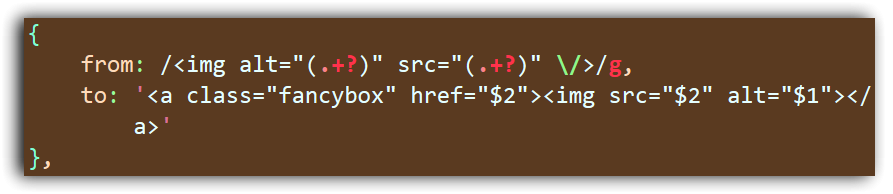
Thanks.

Possibly related issue
1. Request
It would be nice, if Better CoffeeScript will highlight regular expressions.
2. Justification
Extra syntax highlighting.
3. Settings
For example, part of my
Gruntfile.coffeefile:{ from: /<img alt="([A-Za-z0-9А-Яа-я ]+)" src="(.+?)"\/>/g to: '<a class="fancybox" href="$2"><img src="$2" alt="$1"></a>' }4. Steps to reproduce
I open
Gruntfile.coffeefile in Sublime Text inBetter CoffeeScript/CoffeeScript.tmLanguage.5. Actual behavior
All symbols in my regular expression have a scope
source.coffee string.regexp.coffee6. Expected behavior
For example, I open
Gruntfile.jsfile in default Sublime Text JavaScript syntax:Thanks.